
Iberia Digital Library4.9.6 - Google Play
You'll be able to see results in few seconds.
Publisher Description

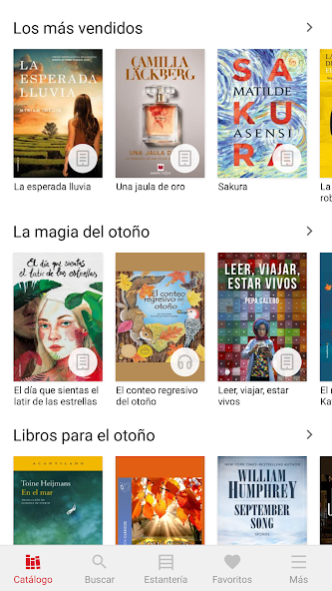
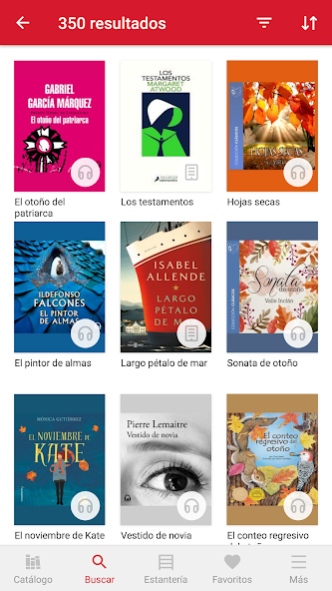
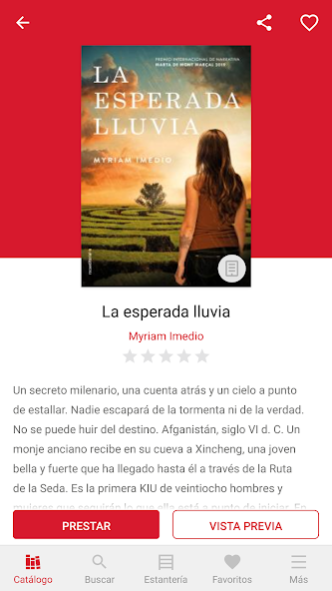
Iberia Digital Library, restricted to authorized Iberia customers, with more than 250 titles in Spanish and English and access from everywhere, every time during the campaign timeline.
The Iberia Digital Library app lets you read eBooks on your smartphone or tablet, browse the Iberia library’s catalog, borrow items and place them on hold, download titles and read them offline. Furthermore, you will be able customize the reading experience to your real needs (font size and type, line spacing, brightness, bookmarks placement, etc).
About Iberia Digital Library
The company that develops Iberia Digital Library is Odilo. The latest version released by its developer is 4.9.6.
To install Iberia Digital Library on your Android device, just click the green Continue To App button above to start the installation process. The app is listed on our website since 2023-08-24 and was downloaded 0 times. We have already checked if the download link is safe, however for your own protection we recommend that you scan the downloaded app with your antivirus. Your antivirus may detect the Iberia Digital Library as malware as malware if the download link to es.odilo.iberia is broken.
How to install Iberia Digital Library on your Android device:
- Click on the Continue To App button on our website. This will redirect you to Google Play.
- Once the Iberia Digital Library is shown in the Google Play listing of your Android device, you can start its download and installation. Tap on the Install button located below the search bar and to the right of the app icon.
- A pop-up window with the permissions required by Iberia Digital Library will be shown. Click on Accept to continue the process.
- Iberia Digital Library will be downloaded onto your device, displaying a progress. Once the download completes, the installation will start and you'll get a notification after the installation is finished.
Program Details
System requirements
Download information
Pricing
Version History
version 4.9.6
posted on 2023-08-24
- We've added new formats and various improvements to your history to make it more complete and useful.
- We continue to improve the interface for Chromebook users.
- If the administrator has included you in a group to carry out learning activities, you will be able to see it in the Account section.
- New design for the Notifications section.
- Saving and synchronization of reading points and playback points has been improved. Bug fixes.
version 4.8.9
posted on 2023-06-14
- We have grouped the ereader settings into fewer menus.
- Two new languages have been added: Arabic and Hebrew.
- New button to remove filters.
- Improvements in the usability of learning experiences, book clubs and reading plans.
- More formats have been supported in the user history.
- Accessibility improvements in focus assignment and element readability using TalkBack.
- Stability improvements and bug fixes.
version 4.4.1
posted on 2022-04-27
- New language available: Ukrainian
- Increased number of selectable values in book viewer settings
- Functionality to warn if there is a new version available
version 4.3.0
posted on 2022-03-08
- New functionality to create custom lists
- Key shortcuts for Chromebook (Ctrl+B, Ctrl+F y Enter)
- Stability improvements
- Bug fixes
version 4.2.0
posted on 2021-11-30
- New filter: Thema (Need to be configured by the admin)
- Borrow and Hold buttons have been added to the Checkouts History
- New reader setting: Display the text in 1 or 2 columns
- We have added the option to delete comments
- We have added the field 'Narrator' in the book info page
- Compatibility with new ebook formats has been added
- Bug fixes and stability improvements
version 4.1.1
posted on 2021-10-22
- New functionality to leave reviews about the titles and see the reviews of other users.
- Redesign of the ratings system. A graph has been added displaying the ratings of other users.
- New interface in the ebook reader. Now you can change the background color of the entire interface.
- Change of some icons for more intuitive versions.
- The More menu sections have been reordered.
- Improvements in video/audio players.
- New selectable language: Turkish.
- Bug fixes and minor improvements.
version 4.0.4
posted on 2021-08-13
- Stability improvements and bug fixes
version 3.9.1
posted on 2021-06-14
- Deactivating devices from the app when the limit is reached
- Improvements in compatibility with eReades and Chromebooks (Solo Android)
- Stability improvements and bug fixes
version 3.8.5
posted on 2021-04-20
- New fields in item description cards
- View user list carousels
- Viewing improvements for iPads and tablets
- Configuration of automatic screen sleeping
- Improvements to search and filter bar
- New catalog browsing mode
version 3.7.0
posted on 2021-02-01
* New font type selectable on eBooks reader
* Improvements and bug fixes
Disclaimer
Official Google Play Link
We do not host Iberia Digital Library on our servers. We did not scan it for viruses, adware, spyware or other type of malware. This app is hosted by Google and passed their terms and conditions to be listed there. We recommend caution when installing it.
The Google Play link for Iberia Digital Library is provided to you by apps112.com without any warranties, representations or guarantees of any kind, so access it at your own risk.
If you have questions regarding this particular app contact the publisher directly. For questions about the functionalities of apps112.com contact us.
